


Chemical equations, such as the one displayed in Figure 3-5, use subscripts. MLTE treats a subscript as a font attribute, so you use the function
TXNSetTypeAttributes
to set the attribute that controls subscripts.
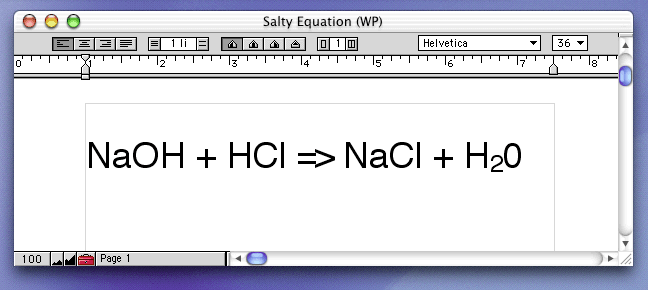
To subscript the 2 shown in Figure 3-5 you would do the following
TXNTypeAttributes
structure to specify the attribute tag, size, and data
TXNSetTypeAttributes
You can use the ATSUI constant
kATSUCrossStreamShiftTag
as the attribute tag. This constant specifies a
cross-stream shift
--a shift in a character's position in the direction against the reading direction. In the case of Figure 3-5, this is a vertical shift.
The data value associated with the cross-stream shift tag is the amount by which the position should be changed with respect to the base line . Values can range from -1.0 to 1.0, with negative values indicating that a character should be drawn lower than the base line. (See the ATSUI reference documentation for more information on stream shift attribute tags and values.)
Listing 3-15 shows how to set text attributes to display a character as a subscript. If you want to display the equation subscript with a smaller font size than the size used for the chemical symbol to which the subscript is associated, you need to change the size attribute for the subscript to an appropriate value.
Listing 3-15	Setting attributes for a subscript
#define myFloatToFixed (a) ((Fixed) ((float) (a) * fixed1))

OSErr   status;
TXNTypeAttributes typeAttr[1];
// Use the ATSUI constant to designate a vertical character shift.
typeAttr[0].tag = kATSUCrossStreamShiftTag;
// The size of the value associated with this tag is a 4-byte fixed.
typeAttr[0].size = sizeof(Fixed);
// The value must be between -1.0 and 1.0. A subscript should be negative.
// You may need to convert the value's type to a fixed value, as shown here.
typeAttr[0].data.dataValue = myFloatToFixed(-0.35);
// Call the MLTE function to set the attribute. You can use the MLTE
// constant to specify the current selection if you are applying the
// attribute to user-selected text. Otherwise, you should specify starting
// and ending offset values for the character you want to subscript.
status = TXNSetTypeAttributes (myTextObject, 1, typeAttr,
                kTXNUseCurrentSelection, kTXNUseCurrentSelection);