


Embedded objects are graphics, movie, or sound data embedded in text data. An embedded object is represented by one character offset in a text object. The offset does not represent the size of the embedded object, it is merely a placeholder for the object. This means you cannot use the number of offsets to calculate the size of the text object if your text object contains embedded data. If you need to calculate the size, you must write your own function to do so.
The
TXNGetData
function does not copy data that cross a data type boundary. But it may be used to copy data that cross a text-run boundary. For example, suppose your document consists of this:

If you call the
TXNGetData
function with a starting offset of 0 and an ending offset of 6, the returned data would contain the characters "abc def" even though the offsets cross a style-run boundary.
However suppose your document consists of this:
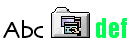
If you call the
TXNGetData
function with a starting offset of 0 and an ending offset of 6, the function returns the result code
kTXNIllegalToCrossDataBoundariesErr
.
If you are not sure whether a text object contains embedded data, you can use the
TXNCountRunsInRange
function to determine how many runs are in the text object. If there is more than one run in the range, you can then use the
TXNGetIndexedRunInfoFromRange
function to determine if the runs contain different types of data. The
oRunDataType
parameter returns the data type of each run. Once you know the run type, you can use the function
TXNGetData
to copy the run data.