


Your application can use MLTE to display advanced typographical features (such as ligatures, diacritical marks, and diphthongs). However, you need to be familiar with Font Manager constants and the Apple Type Services for Unicode Imaging (ATSUI) data types.
To have your application provide your users with the ability to apply advanced typographical features to text they select, your application needs to do the following:
TXNTypeAttributes
structure
TXNSetTypeAttributes
Your application can provide an interface that lets users view and select advanced font styles, font features, and font variations. One approach is to create a typography dialog that has three panes--Styles, Features, and Variations. This would allow users control over all the advanced ATSUI typography that can be set using the MLTE function
TXNSetTypeAttributes
. Figure 3-6 shows a sample features dialog. The dialog lets users access a few of the ATSUI features that can be set using the MLTE function
TXNSetTypeAttributes
. Depending on your users' needs, your application could create a feature dialog that lists all ATSUI features that can be set, or you could limit user-selectable font features to those most important to your users.
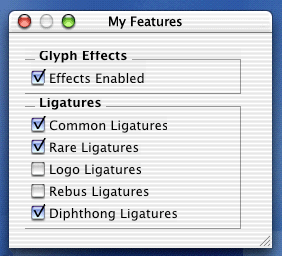
Your application then responds to user selections from the features dialog. Depending on how you set up the user interface, your application can respond on an item-by-item basis, or can apply, at the same time, all changes specified in the dialog.
Translating the user's selections into the appropriate font feature type and font feature selector constants requires some research as you write your application. You need to be familiar with Font Manager constants that specify font feature types and the ATSUI data types for ATSUI font features and font variations. These constants and data types are defined in the ATSUI reference documentation:
http://developer.apple.com/techpubs/macosx/carbon/text/ATSUI/atsui.html
For example, imagine your user has just made changes to the Ligatures section of the Features pane shown in Figure 3-6. Your application should represent the ligatures feature by using the
kLigaturesType
constant defined in the "Font Feature Type Constants" section of the Font Manager reference documentation:
http://developer.apple.com/techpubs/macosx/carbon/text/FontManager/fontmanager.html
To represent the specific ligature selections made by the user, you need constants that indicate that rare, common, and diphthong ligatures are enabled, while logo and rebus ligatures are disabled. So your application would use the following font feature type constants:
kRareLigaturesOnSelector
,
kCommonLigaturesOnSelector
,
kDiphthongLigaturesOnSelector
,
kLogosOffSelector
, and
kRebusPicturesOffSelector
.
You would take a similar approach for any font feature or font variation. First, look up the constant that represents the feature or variation category. Then look up the constants that represent the state of each feature or variation in that category.
You can use the MLTE function
TXNSetTypeAttributes
to set a variety of features from simple to the most complex ATSUI features. The
iAttributes
parameter of the
TXNSetTypeAttributes
function is an array of
TXNTypeAttributes
structures that you use to indicate what features you want to set and the values to which the features should be set.
A
TXNTypeAttributes
structure has a
TXNAttributeData
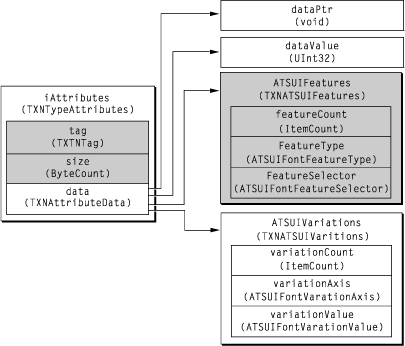
union as one of its fields. The kind of attribute your application needs to set determines the data contained in the union. For ATSUI features, your application should supply
atsuFeatures
data, as defined by the
TXNATSUIFeatures
data structure. The
TXNATSUIFeatures
structure contains information about the number of features in the structure, along with pointers to the feature type and selector information (that is, whether a feature is enabled or not).
You can also use the MLTE
TXNSetTypeAttributes
function to set font variations data. In this case, your application would supply
atsuVariations
data in the
TXNAttributeData
union.
Figure 3-7 shows the
TXNTypeAttributes
structure and its fields. The shaded areas show the fields for which your application needs to provide data in order to change the ATSUI font features for a selection.
Once your application identifies the kind of data (feature or variation) it needs to set, then it needs to assign the appropriate values to the
tag
and
size
fields of the
TXNTypeAttributes
structure. The
tag
field determines the kind of data in the
TXNAttributeData
structure and the
size
field indicates the size of the attribute data. If your application needs to set ATSUI feature data, it would use the constant
kTXNATSUIFontFeaturesAttribute
for the
tag
field. It would use
sizeof(TXNATSUIFeatures)
for the
size
field. See
"Font Run Attributes"
for a description of the constants you can use for the
tag
field. See "
Font Run Attribute Sizes"
for a description of the constants you can use for the
size
field.
Finally, your application needs to supply ATSUI feature data. You need only take the constants you identified based on the user's selections (see Listing 3-16) and assign them to the appropriate fields of the
TXNATSUIFeatures
structure.
Listing 3-16	Assigning parameter values for diphthongs
TXNTypeAttributes       typeAttr[1];
TXNATSUIFeatures        myFeatures;
TXNObject               textObject;

myFeatures.featureCount     = numFeatures;
// Use a Font Manager constant to specify the feature type.
// In this case, you need to specify a ligatures type.
myFeatures.featureTypes     = kLigaturesType;
// Use the Font Manager constant to specify you want
// diphthong ligatures enabled.
myFeatures.featureSelectors = kDiphthongLigaturesOnSelector;
// Use an MLTE constant to assign a tag value.
// In this case, you need to specify an ATSUI font features attribute.
typeAttr[0].tag = kTXNATSUIFontFeaturesAttribute;
// Specify the data size is the size of the TXNATSUIFontFeatures structure.
typeAttr[0].size = sizeof (TXNATSUIFontFeatures);
// Set the value of the data field.
typeAttr[0].data.atsuFeatures   = (TXNATSUIFeatures *)&myFeatures;
Once you have determined which constants to use and to which fields of the
TXNTypeAttributes
structure the constants should be assigned, the call to the MLTE function TXNSetTypeAttributes is straightforward. In addition to the
TXNTypeAttributes
structure, you need to pass the current text object and the starting and ending offsets of the current selection.
Listing 3-17	Calling the MLTE function to set type attributes
OSErr status = TXNSetTypeAttributes (textObject, 1, typeAttr,
                    kTXNUseCurrentSelection, kTXNUseCurrentSelection);
Your application needs to update the display to reflect your user's selections. You need to check or uncheck items in the features dialog to reflect whether the item is now enabled or disabled.