A user can select a range of text to be edited or your application can set the selection range programmatically. A user can define a selection by creating a new one or modifying the current one. A new selection is defined by the Select All command, by mouse actions (single-, double-, or triple-clicking or dragging), or by using the arrow keys (which could be combined with the Command or Option keys). A selection can be modified by pressing the Shift key and performing a mouse-based or arrow key-based selection action. MLTE interprets user actions to modify a selection according to the fixed-point method described in the Macintosh Human Interface Guidelines.
The anchor point is the position in the text at which the user positions the pointer and presses the mouse button. When visual feedback shows the desired range, the user releases the mouse button. The point at which the button is released is called the active end of the range. The user can expand or shrink the active selection by performing a modifying action such as pressing and holding the Shift key while pressing an arrow key. If necessary, the text scrolls to make a selection visible in the view rectangle. See Chapter 10, "Behaviors," of Macintosh Human Interface Guidelines for more details, including illustrations, on selection behavior.
Single-clicking defines an insertion point. Double-clicking selects a word as defined by the Script Manager or ATSUI. Triple-clicking selects a visual line from the beginning of the line to the beginning of the next line. Quadruple-clicking selects the paragraph. If the user performs a double, triple, or quadruple click, then drags, the selection grows by words, visual lines, or paragraphs respectively. A click in an empty space is mapped to some location that has text.
Regardless of how text is selected, the selected text becomes the current selection range. MLTE uses a byte offset to identify the position of a character in the text object, and a text object includes fields that specify the byte offsets of the characters that correspond to the beginning and the end of the current selection range in the displayed text. A graphics, movie, or sound object embedded in a text object is treated as a single character.
When the byte offset values for the beginning and the end of the selection range are the same, the selection range is an insertion point. MLTE displays an insertion point as a blinking caret in the form of a vertical bar (|). You can turn caret display on or off by setting the appropriate frame option when you create a new text object in MLTE.
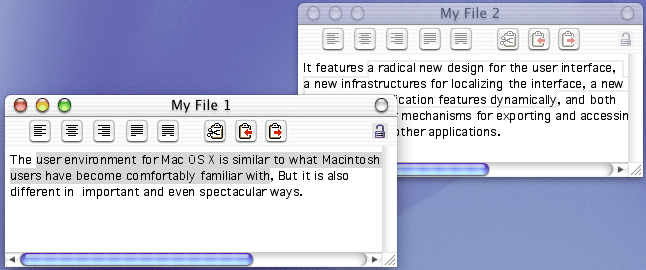
MLTE highlights a selection range. Highlight regions for nonempty selections are drawn in the system highlight color, while carets are drawn in black. MLTE uses outline highlighting (see Figure 2-6) for selected text in an inactive window, as required by the Drag Manager.
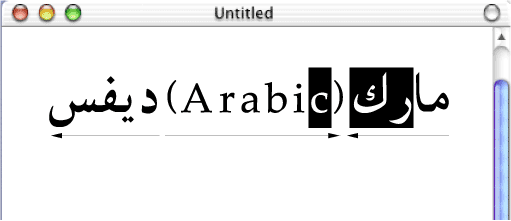
Because MLTE supports bidirectional text, the selection range can appear as discontinuously highlighted as shown in Figure 2-7. Displayed text is highlighted according to the storage order of the characters. When multiple script systems with different line directions are installed, a continuous sequence of characters in memory may appear as a discontinuous selection when displayed.