


Tab settings and text alignment are characteristics that apply to an entire text object.
MLTE interprets tab characters based on the one-tab-per-document standard found in many simple text editors. Each tab character maps to an initial width. As MLTE flows text onto a line, each tab is replaced by the width value necessary to place the start of the text following the tab at a given position on the line. As the text placed before the tab grows, the white space appears to shrink until the preceding text becomes long enough to envelop the entire tab. At that point, the tab assumes its full width and the text following the tab jumps ahead. Figure 2-4 illustrates this point.
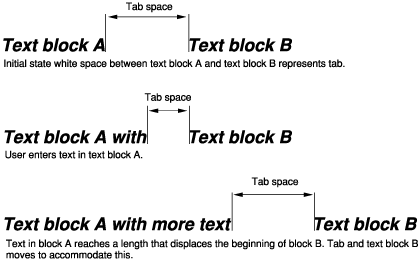
MLTE flows tab widths in the line direction for the line being formatted. If text is wrapped automatically and a tab width extends past the trailing margin (the right margin on a Roman system), MLTE wraps the line and the next visual line begins with the tab width.
MLTE allows you to specify the alignment of the lines of text, that is, their horizontal placement with respect to the left and right edges of the text area or destination rectangle . The different types of alignment that MLTE supports accommodate script systems that are read from right to left as well as those that are read from left to right. MLTE supports the following types of alignment:
When word wrap is turned off, MLTE uses left alignment for all text.