


MLTE supports onscreen text editing by maintaining information about where the text is stored, where to display it, and the text attributes (style, font, and so forth). This information is contained in an opaque structure called a
TXNObject
, or
text object
. From the user's perspective, a text object could take many forms. For example, if your application is a simple text editor, a user views the text object as a document that can be saved, opened, and edited. If your application is a drawing program that uses MLTE for labeling support, the user views a text object as a label or caption associated with a graphic object. If your application is a natural-language query program that uses MLTE for query input, a user views the text object as an input window.
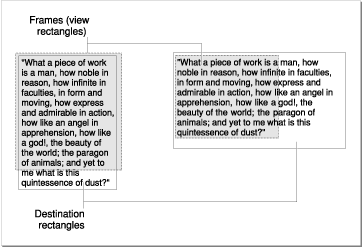
When your application calls the MLTE function TXNNewObject to create a text object, you specify the window in which the text is to be drawn. The window defines the destination rectangle --the area in which the text is drawn. You also have the option to specify the frame. The frame is that portion of the window within which the text is actually displayed. It is sometimes referred to as the view rectangle .
Figure 2-1 shows two sets of frames and destination rectangles. The frames are shaded and defined by dotted lines. The text is drawn in the destination rectangle; the part of it that is displayed is defined by the frame.
A
TXNObject
is an opaque structure, so your application cannot access it directly and "MLTE Reference" does not define explicitly the fields in the
TXNObject
. A
TXNObject
contains references to the window frame and