


Your application can provide a Layout menu that allows the user to enable and disable automatic word wrap. Once you create a Layout menu that contains a word-wrap item, you can indicate to the user whether automatic word wrap is enabled or disabled by displaying a checkmark or other visual indicator next to the item if it is enabled. Figure 3-4 shows a Layout menu that has the Word Wrap item checked.
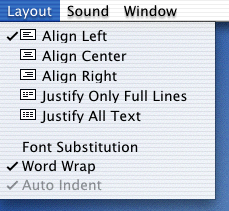
When a user changes the word-wrap setting, your application can use the
TXNGetTXNObjectControls
and
TXNSetTXNObjectControls
functions to get the current setting and then to toggle the setting appropriately. These functions are used to get and set a number of document-wide settings, so you need to use the
iControlTags
parameter to specify that automatic word wrap is the setting you want to change. MLTE provides a constant called
kTXNWordWrapStateTag
that you can use for the
iControlTags
parameter.
You use the
iControlData
parameter of the
TXNSetTXNObjectControls
function to specify the new value of the word-wrap setting. MLTE provides two constants called
kTXNAutoWrap
and
kTXNNoAutoWrap
that you can use to specify the word-wrap state.
Listing 3-13 shows a
MyDoWordWrap
function that your application can call from a menu-handling function to enable or disable word wrap in response to what your user selects from a Layout menu you create.
Listing 3-13	Toggling the word-wrap setting
void MyDoWordWrap (WindowPtr theWindow)
{
    TXNObject   textObject = NULL;
    MenuHandle  layoutMenu;
    OSStatus    status = noErr;
    layoutMenu = GetMenuHandle (mLayout);
    TXNControlTag               controlTag[1];
    TXNControlData              controlData[1];

    // Call your own function to get text object.
    MyGetTextObject (theWindow, &textObject);
    // Assign the MLTE constant that specifies word-wrap state.
    controlTag[0] = kTXNWordWrapStateTag;
    // Call the MLTE function to get the current value of the
    // word-wrap state.
    status = TXNGetTXNObjectControls (textObject, 1,
                                        controlTag, controlData);
    // If automatic word wrap is enabled
    if (controlData[0].uValue == kTXNAutoWrap)
        {
            // disable it
            controlData[0].uValue = kTXNNoAutoWrap;
            // and call the Menu Manager function to
            // uncheck this menu item.
            CheckItem (layoutMenu, iAutoWrap, false);
        }
        else
        {
            //Otherwise enable automatic word wrapping
            controlData[0].uValue = kTXNAutoWrap;
            // and call the Menu Manager function to
            // check this menu item to show word wrap is enabled.
            CheckItem (layoutMenu, iAutoWrap, true);
        }
        // Call the MLTE function to change the word-wrap setting.
        status = TXNSetTXNObjectControls (textObject, false, 1,
                                        controlTag, controlData);
        // If there is an error
        if (status != noErr)
            // call your own error handling function.
            MyAlertUser (eNoWordWrap);
}