


When your application receives an activate or deactivate event, it needs to activate or deactivate a text object by calling the
TXNActivate
function. If the text object was previously inactive, the
TXNActivate
function removes any visual indication of its inactive state and then sets the state of the scroll bars so they are drawn correctly in response to update events. Figure 3-3 shows examples of text objects that are activated and deactivated.
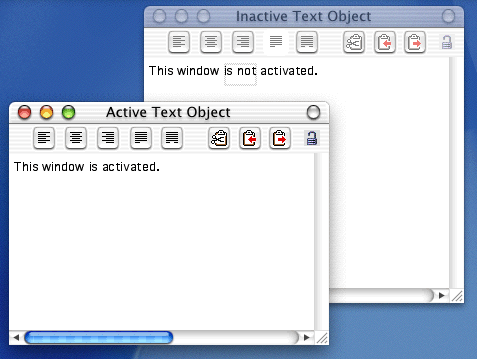
Note that if your application sets the
iActiveState
parameter to
kScrollBarsAlwaysActive, the scroll bars are active even when the text object is not focused (that is, the insertion point is not active). You can use the
TXNActivate
function if you have multiple text objects in a window and you want all of them to be scrollable even though only one at a time can be focused. Before you call
TXNActivate
, you should call the function
TXNFocus
to focus the scroll bars and insertion point so they become active or inactive, depending on whether you are activating or deactivating the text object.
Listing 3-11 shows a
MyDoActivate
function that handles activation events.
Listing 3-11	Handling an activation event
void MyDoActivate (WindowPtr theWindow, Boolean  becomingActive)
{
    TXNObject           textObject;
    TXNFrameID          frameID     =   0;
    OSStatus            status      =   noErr;

    // Call your own function to get the text object.
    MyGetTextObject (theWindow, &textObject);
    // Call your own function to get the frame ID of the text object.
    MyGetFrameID (theWindow, &frameID);
    // Call the MLTE function to focus the scroll bars and insertion
    // caret so they will become active or inactive, depending on the
    // state of the becomingActive parameter.
    TXNFocus (textObject, becomingActive);
    // If the text object is becoming activated
    if (becomingActive)
        {
            // call the MLTE function to activate the text object.
            TXNActivate (textObject, frameID, kScrollBarsAlwaysActive);
            // Then call your function to adjust the menus appropriately.
            MyAdjustMenus ();
        }
    else
            // Call the MLTE function to deactivate the text object.
            TXNActivate (textObject, frameID, kScrollBarsSyncWithFocus);
    }