


MLTE provides functions that your application can use to determine whether a File and Edit menu item should be enabled or disabled. (When a menu item is enabled, a user can select it from the menu. When a menu item is disabled, it appears dimmed to the user.) shows two Edit menus, the first with more items enabled than the second.
Note: If your application uses an MLTE Font menu object, you do not need to update the Font menu. When your application handles the command, MLTE updates the menu automatically.
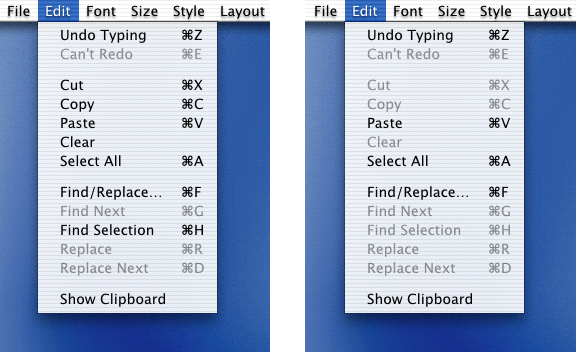
The Cut, Copy, and Clear items from the Edit menu operate on selected text. Before you enable these items in the Edit menu, your application should check whether the user has selected text by calling the
TXNIsSelectionEmpty
function. If
TXNIsSelectionEmpty
returns
false
(meaning text is selected) then your application should enable the Cut, Copy, and Clear menu items.
The Paste item in the Edit menu should be enabled if the current scrap contains data supported by MLTE. You can test the current scrap by calling the
TXNIsScrapPastable
function. If
TXNIsScrapPastable
returns
true
, then your application should enable the Paste menu item.
The Select All menu item should be enabled if a text object contains any data at all. The
TXNDataSize
function returns the size of a text object. If the returned value is not zero, your application should enable the Select All menu item.
The Save menu item should be enabled if any changes were made to the text object since the text object was created or saved last. You can check for changes by calling the
TXNGetChangeCount
function. If the function returns a value greater than 0, then changes have been made.
The Undo and Redo command should be enabled if the previous action by the user is undoable or redoable. You can use the functions
TXNCanUndo
and
TXNCanRedo
to test whether these menu items should be enabled. These functions also return a value that indicates the action than can be undone or redone. You can use this information to customize the Edit menu. For example, Figure 3-2 shows an Undo Typing menu item instead of simple Undo menu item.
Listing 3-8	Updating File, Edit, and Font menu items
void MyUpdateFileEditFontMenus ()
{
    WindowPtr theWindow;                    // reference to the window
    MenuHandle menu;                        // reference to menu
    Boolean cutCopyClear;
    Boolean paste;
    TXNObject  textObject;                  // text object
    OSStatus   result = eventNotHandledErr;   // report failure by default

    // Call the Window Manager function to get the window reference.
    theWindow = FrontWindow ();
    // Call your own function to get text object.
    MyGetTextObject (theWindow, &textObject);
    // -------------- Updating File Menu Items --------------
    menu = GetMenuHandle (mFile);
    // Enable the New item if it is possible to open more documents.
    if (gNumDocuments < kMaxOpenDocuments)
        EnableMenuItem (menu, kNew);
    else
        DisableMenuItem (menu, kNew);
    // Enable the Save and Save As items if the text has been changed.
    if (TXNGetChangeCount (textObject) > 0 )
        {
            EnableMenuItem (menu, kSave);
            EnableMenuItem (menu, kSaveAs);
        }
    else
        {
            DisableMenuItem (menu, kSave);
        }
    // Enable Print, Page Setup, and Close if a window is open.
    if (theWindow != NULL)
        {
            EnableMenuItem (menu, kPageSetup);
            EnableMenuItem (menu, kPrint);
            EnableMenuItem (menu, kClose);
        }
    else
        {
            DisableMenuItem (menu, kPageSetup);
            DisableMenuItem (menu, kPrint);
            DisableMenuItem (menu, kClose);
        }
    // ------------- Updating Edit Menu Items --------------
    menu = GetMenuHandle (mEdit);
    // If there is a selection, enable the Cut, Copy, and Clear items.
    if (!TXNIsSelectionEmpty (textObject))
        {
            EnableMenuItem (menu, kCut);
            EnableMenuItem (menu, kCopy);
            EnableMenuItem (menu, kClear);
        }
    else
        {
            DisableMenuItem (menu, kCut);
            DisableMenuItem (menu, kCopy);
            DisableMenuItem (menu, kClear);
        }
    // If there is anything on the scrap, enable the Paste item.
    if (TXNIsScrapPastable ())
            EnableMenuItem (menu, kPaste);
    else
            DisableMenuItem (menu, kPaste);
    // It the text object is not empty, enable the Select All item.
    if (TXNDataSize (textObject) > 0)
            EnableMenuItem (menu, kSelectAll);
    // If the last action is undoable, enable the Undo item.
    if (TXNCanUndo (textObject, &actionKey))
            EnableMenuItem (menu, kUndo);
    else
            DisableMenuitem (menu, kUndo);
    // If the last action is redoable, enable the Redo item.
    if (TXNCanRedo (textObject, &actionKey))
            EnableMenuItem (menu, kRedo);
    else
            DisableMenuItem (menu, kRedo);
    // ------------- Updating the Font Menu--------------
    menu = GetMenuHandle (mFont);
    if (menu == gFontMenu)
            EnableMenuItem (gFontMenu, 0);
    // Call the Menu Manager function to indicate the menu bar
    // needs to be updated by the Event Manager.
    InvalMenuBar ();
}