Functions for Displaying File Previews
The following section describes four functions that let you display file previews.The Movie Toolbox provides two functions that allow you to display file previews in an Open dialog box in System 6 using standard file reply structures:
SFGetFilePreviewandSFPGetFilePreview. The Movie Toolbox also supplies two new functions that allow you to display file previews in an Open dialog box in System 7 using standard file reply structures:StandardGetFilePreviewandCustomGetFilePreview.
All of these functions take the same parameters as their existing counterparts with the addition of a
- The
SFGetFilePreviewfunction corresponds to the File Manager'sSFGetFileroutine. This function is the preferred function for creating a file preview and works with either System 7 or System 6.- The
SFPGetFilePreviewfunction corresponds to the File Manager'sSFPGetFileroutine.- The
StandardGetFilePreviewfunction corresponds to the File Manager'sStandardGetFileroutine.- The
CustomGetFilePreviewfunction corresponds to the File Manager'sCustomGetFileroutine. This function is available only in System 7.
whereparameter that allows you to specify the location of the upper-left corner of the dialog box. See Inside Macintosh: Files for information on theSFGetFile,SFPGetFile,StandardGetFile, andCustomGetFileroutines.The
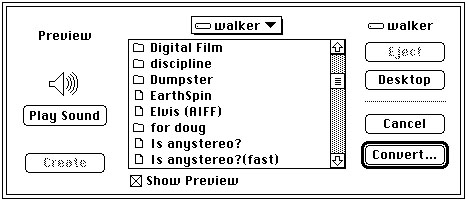
SFGetFilePreview,SFPGetFilePreview,StandardGetFilePreview, andCustomGetFilePreviewfunctions allow the user to automatically convert files to movies if your application requests movies. If there is a file that can be converted into a movie file using a movie import component, then the file is shown in the Standard File dialog box in addition to any movies. When the user selects the file, the Open button changes to a Convert button. Figure 2-38 provides an example of this dialog box.Figure 2-41 Dialog box showing automatic file-to-movie conversion option
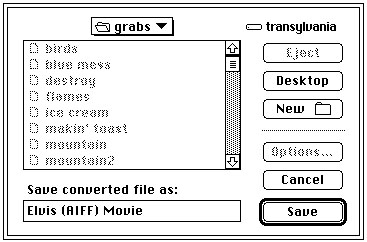
Choosing Convert displays a dialog box that allows the user to choose where the converted file should be saved. Figure 2-39 shows this dialog box.
Figure 2-42 Dialog box for saving a movie converted from a file
When conversion is complete, the converted file is returned to the calling application as the movie that the user chose. If you want to disable automatic file conversion in your application, you must write a file filter function and pass it to the file preview display function you are using. Your file filter function must call the File Manager's
FSpGetFileInfofunction on each file that is passed to it to determine its actual file type. If the File System parameter block pointer passed to your file filter function indicates that the file type is'MooV', and the actual type returned byFSpGetFileInfois not'MooV', then the file filter function will convert this file. If you do not wish a file to be displayed as a candidate for conversion, your file filter function should return a value oftruewhen it is called for that file.See "File Filter Functions" beginning on page 2-338 for comprehensive details on the interaction of application-defined file filter functions with the file preview display functions. For information of
FSpGetFileInfo, see Inside Macintosh: Files.
- Note
- The functions described in this section do not appear in the MPW interface file
Movies.h; rather, they are listed inImageCompression.h.